
Roles and permissions
Owner, admin, estimator, finance, warehouse and read only: who can see and change what, including cost prices.
Every member of a workspace has one role, and the role decides what they can see and change. There are six: Owner, Admin, Estimator, Finance, Warehouse and Read only.
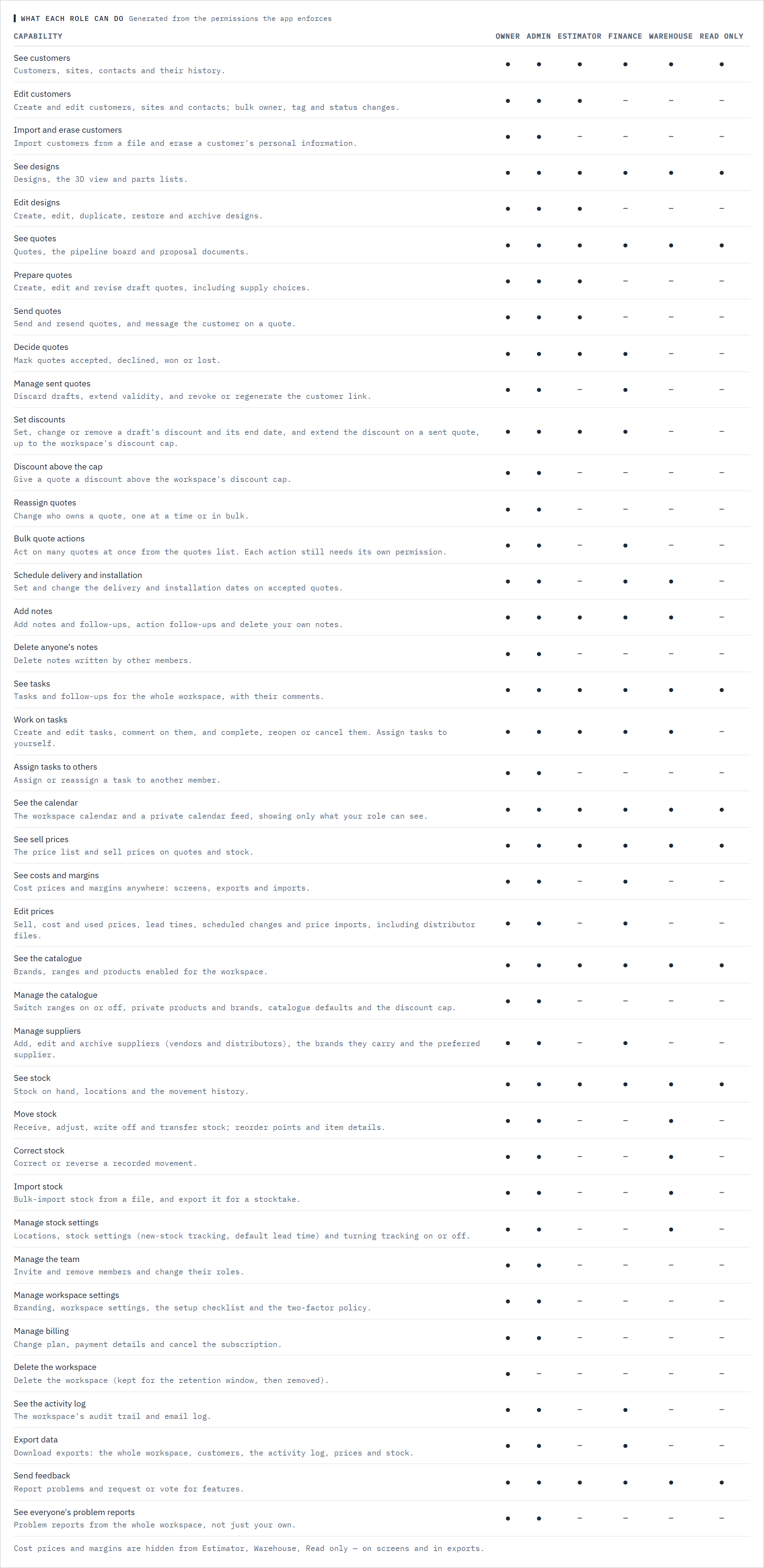
Cost prices and margins follow the role, not a setting. Owners, admins and finance see them. Nobody else does, on any screen, export or import.
The six roles
Step 1: Owner
Everything, including billing and deleting the workspace. Only an owner can make someone else an owner or change an owner's role.
Step 2: Admin
Everything except deleting the workspace: the team, branding and settings, the catalogue, prices, stock and billing.
Step 3: Estimator
Customers, designs and quotes, from first draft to won or lost: prepare, send and resend quotes, message the customer, and mark quotes accepted or lost. Discounts up to the workspace cap. Works quotes one at a time: no bulk actions, and can't reassign a quote to someone else. Sees sell prices only, and sees stock without moving it. Sees delivery and installation dates but doesn't set them.
Step 4: Finance
Prices, costs and margins: edits the price list, imports price and distributor files and exports them. Marks quotes accepted, declined, won or lost, extends validity, discards drafts and revokes or regenerates customer links, but doesn't prepare or send quotes. Sets and extends discounts up to the workspace cap, and extends, marks lost or exports many quotes at once from the quotes list. Sets delivery and installation dates on accepted quotes. Sees the activity log and exports data. Sees stock without moving it.
Step 5: Warehouse
Stock: receives, counts, writes off and transfers it, corrects movements, imports stock counts, manages locations and inventory settings, and starts or stops tracking. Sets delivery and installation dates on accepted quotes. Sees customers, designs and quotes without changing them. Sees sell prices only.
Step 6: Read only
Sees customers, designs, quotes, sell prices, stock, tasks and the calendar without changing anything. No costs.
Check who can do what
Step 7: Open the capability table
In the navigation, under Workspace, choose Team and scroll to What each role can do. Each row is one capability, such as See costs and margins or Correct stock, with a dot under every role that has it. The table is generated from the same permissions Baylogik checks on every screen and action, so it always matches what the app does.
 (opens full size in a new tab)
Generated from the permissions Baylogik enforces, so it always matches what each role can do. Step 8: Change someone's role
Owners and admins pick a new role from the person's row on the Team page. See Invite your team.
Good to know
- Estimators, warehouse and read-only members never see cost prices, used cost or margins: not on the price list, not on quotes, and not in exports or imports. Their stock value is shown at sell instead of cost.
- Exporting the price list needs a role that exports data: owner, admin or finance. Only those three roles edit prices, and only they can run a distributor import.
- Set discounts (owners, admins, estimators and finance) covers setting, changing, removing and extending a quote's discount, up to Max discount without an owner or admin on the Catalogue page. Discount above the cap is owners and admins only. See Discounts and end dates.
- Reassign quotes (owners and admins) changes who owns a quote, one at a time or in bulk, and only to an owner, admin or estimator. Bulk quote actions (owners, admins and finance) puts checkboxes on the quotes list. Each bulk action still needs its own capability: Reassign quotes to reassign, Manage sent quotes to extend validity, Decide quotes to mark lost and Export data to export. See Create and send a quote.
- Estimators, finance and warehouse members can add notes; read-only members can't. Every role can report a problem and request or vote for features.
- Every role except read only works on tasks: creates them, adds notes, completes, cancels and reopens them, and takes unassigned ones. Only owners and admins give a task to someone else. See Tasks and follow-ups.
- Every role sees the calendar and can subscribe to a calendar feed, but only with the dates the role could open anyway: quote dates need access to quotes, price changes need access to the price list. See The calendar.
- Existing members kept their access when the six roles arrived: sales is now Estimator and view only is now Read only. Two things changed for estimators: they no longer see cost prices, and they no longer receive or adjust stock. Give stock to a warehouse member.
- The Finance and Warehouse roles come with the Team plan and the trial. On Starter they can't be given to anyone, and existing Finance or Warehouse members get Read-only access until the workspace moves to Team. See Plans, trial and billing.
- When a workspace is read-only because its trial or subscription ended, every role keeps what it can see, and owners, admins and finance can still export, but nobody can create or change anything until it's subscribed again.
- A refusal such as Your role can't move stock. means the role doesn't hold that capability. Ask an owner or admin to change your role.
Related articles
- Invite your teamInvite people, give them a role, and change or remove access.
- Plans, trial and billingThe 30-day trial, Starter, Team and Enterprise, seats, applying a code, and what happens when a trial ends.
- Price your rackingCost, sell and margin, lead times, and editing prices in Excel.
- Used pricing and stockOffer used equipment alongside new, and count the stock you hold.